There is no one-click button that moves a fantasy football league from ESPN, Yahoo or NFL Fantasy to Sleeper or Fantrax. What you do instead is document the league, recreate it on the destination with identical settings, import the history the destination is willing to take, and rebuild by hand whatever it refuses. Most of that is an afternoon’s work plus a slow weekend of verification.
If you’re searching for how to move your league to a new platform, the honest version is that the history usually comes with you, but never automatically, and never everything at once. Rosters, standings and past results port well. Custom scoring math, farm systems and years of trade notes are the parts you carry yourself.
The order matters too. Commissioners who start with the app download almost always end up re-doing it, because the platform choice is the easy decision and the data inventory is the real one.
Table of Contents
- What You Need
- Step-by-Step
- 1. Audit and Export Your Current League
- 2. Choose the Right Destination Platform
- 3. Create and Configure the New League
- 4. Import Rosters, Players, and League History
- 5. Test Rosters, Scoring, and Critical Settings
- 6. Notify Managers and Issue New Invitations
- 7. Complete the Cutover and Archive the Old League
- Common Mistakes
- Quick Tips
- Frequently Asked Questions
- Can I move a fantasy football league without losing its history?
- How long does it take to move my league to a new fantasy platform?
- What should I do if the destination platform cannot import my league?
- Will my league members keep the same usernames and passwords?
- Should I close my old fantasy league immediately after migrating?
- How do I preserve scoring and roster settings when platforms differ?
- Conclusion
What You Need
Gather these before you touch anything on the destination side.
- The current league ID. Every host uses its own code — a number on ESPN, a URL string on Yahoo, a short key on Sleeper. It’s the starting point for every import tool.
- Admin credentials for the league you are leaving, including the account that actually created it. More on why that matters in step four.
- A complete export. Download every CSV, JSON or platform backup the old host offers while it still offers them.
- Your written settings notes: roster format, scoring, divisions, playoff config, waiver rules, budget or auction settings, keeper rules.
- Roster and transaction notes for dynasty and keeper leagues — farms, draft capital, future picks, years of keeper decisions.
- Manager contact details with the email each person actually uses, not one they registered with years ago and abandoned.
- A downtime window. Two to three hours on a weeknight, ideally before a waiver window opens.
Build the inventory as a spreadsheet. It doubles as your verification checklist in step five and as the record you keep after the old platform forgets everything.
Step-by-Step
1. Audit and Export Your Current League
Write down what your league actually is before you move it. League type (redraft, keeper, dynasty, dynasty superflex, salary cap), member count, number and names of divisions, roster size and positions, scoring formula, draft type, waiver type and frequency, trade review rules, playoff structure, tiebreakers.
Then export what exists. On most platforms that means a CSV of rosters, one of draft results, one of weekly scores and standings, plus screenshots of the settings pages because screenshots outlive menus that get reorganised. Save everything with a date stamp in the filename.
You are aiming for a file that would let a stranger rebuild your league from scratch. That test is worth running now, because it tells you immediately what you’ll be rebuilding by hand later.
2. Choose the Right Destination Platform
Compare candidates on the things that actually block a migration, not on feature checklists.
- Import compatibility. Ask specifically whether the platform can read history from your source host, and whether that import includes draft boards and transaction logs or only standings and rosters.
- Scoring flexibility. If you run anything beyond standard or PPR — TEP bonuses, custom IDP points, tiered rushing bonuses, nonstandard passing formulas — check whether the builder reproduces it. This is the number one reason moves stall.
- Keeper and dynasty support. Keeper leagues need configurable keeper counts and rules that survive the offseason. Dynasty leagues need farm system depth, franchise tags, future pick trading and a usable draft board that holds up to 200+ picks.
- Commissioner controls. Trading settings, lineup locks, weekly locks, commissioner add/drops, archived leagues.
- Mobile and app quality, support responsiveness, and privacy terms. Free versus paid tiers differ mainly in league count, messaging and customisation — decide which of those you actually use.
- History retention. Does the platform keep old seasons chained to the current one, or do you get a fresh start each year?
Be skeptical of any tool asking for your old platform’s password. Read-only access is the standard to hold every importer to.
3. Create and Configure the New League
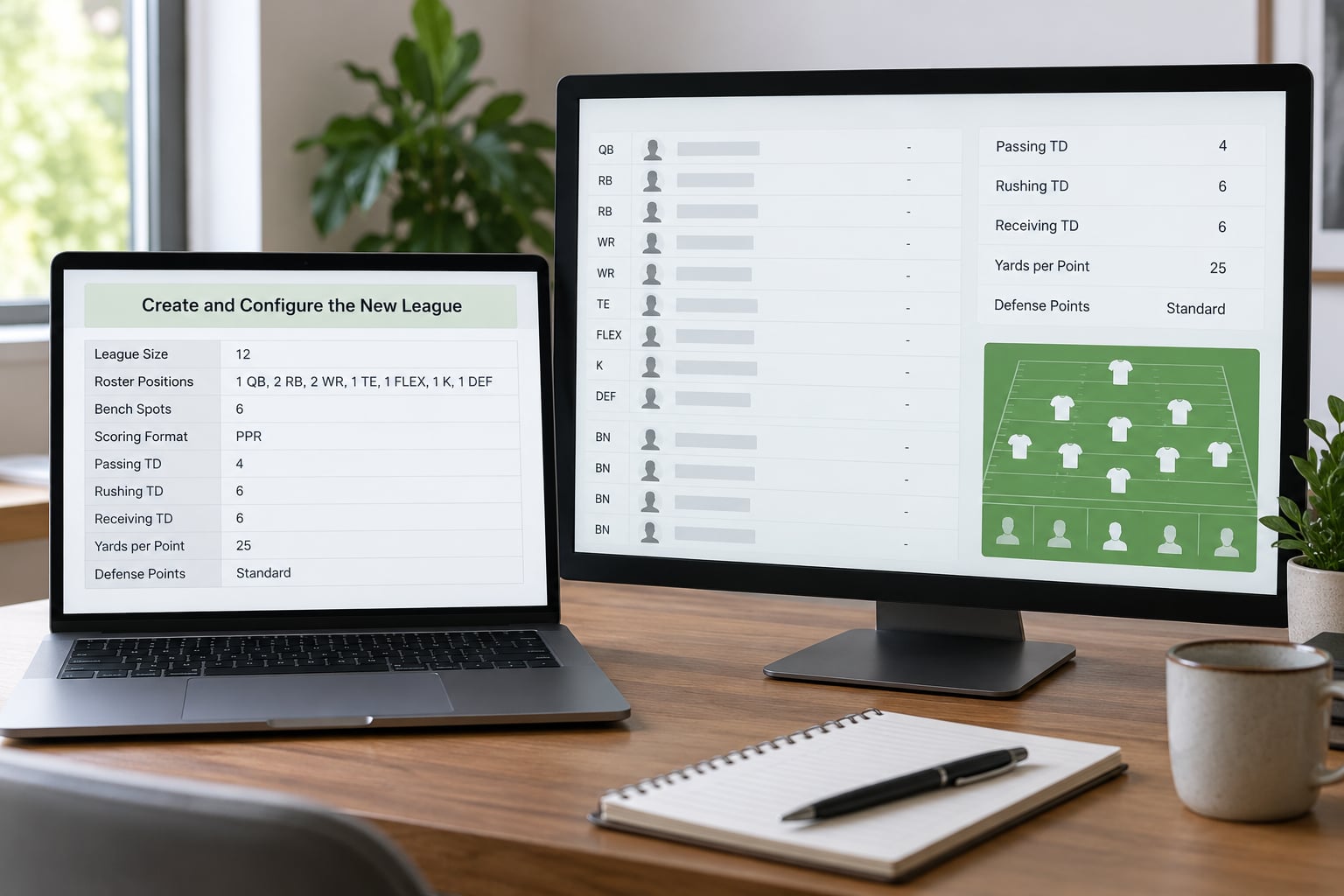
Create the league fresh on the destination and configure it from your inventory rather than from memory. Roster slots, positions, divisions, scoring, waiver type, trade settings, draft configuration, budget or auction caps, commissioner privileges — set them in that order, and screenshot each screen as you go.
If the destination has a native importer that reads settings from the source league, run it before you hand-tune anything. Then go back and correct the differences the importer introduced, which is usually the scoring formula.
4. Import Rosters, Players, and League History
Three paths exist, and most leagues use more than one.
Native importer. Several hosts will pull past seasons from another provider directly when you supply the league ID. Availability changes, so check inside the app rather than trusting a blog post — including a blog post like this one.
Third-party importer. Archive and migration services stitch multiple platforms into one record book, which is the practical answer when your league has already hopped hosts two or three times and no single chain holds the whole story. The good ones ask for connect-style, read-only permission and never ask for your password.
Manual entry. Champions, all-time regular-season records, notable trades and draft picks still get typed in by hand. Note which seasons you entered manually, so future-you knows which numbers are verified against a source.
Where imports fall short — usually drafts, transactions and awards — the fallback is mapping old team names to new franchise records. Renamed franchises are still the same franchise, and inconsistent mapping will make your all-time standings read as two different teams.
5. Test Rosters, Scoring, and Critical Settings
Run a verification routine before anyone else logs in. Take one completed week from last season and enter the same player stats on both platforms, then compare the totals.
Check, in this order:
- Roster eligibility rules — position eligibility, flex handling, IR slots, minimum lineup requirements.
- Scoring: points per reception, bonus thresholds, interception and fumble treatment.
- Roster accuracy against the CSV you exported, including injured designations.
- Waiver behaviour: priority order reset, waiver budget carryover, dropped-player treatment.
- Trade history where the platform displays transactions, and keeper rules reproducing the right keeper count.
- Division standings and playoff seeding, including tiebreakers.
If a scoring total differs, fix it before the managers return. Changing it later means re-verifying every historical season, and nobody wants to explain that twice.
6. Notify Managers and Issue New Invitations
Tell your leaguemates after the test passes, not before. The pitch is stronger when you can say “it’s built and verified, here’s your link” rather than “we’re thinking about it.”
Send one message with the new league link, the deadline to join, and the specific reason you moved — a shutdown, a scoring limitation, better dynasty tooling. Give them a window of a few days and set a firm start date. Answer corrections from a single channel so nothing gets lost in the group chat.
Pick one rule and state it plainly: changes happen on the new league only, from the cutover date forward. Two platforms with live rosters and two waiver wires will produce duplicate players and a very unpleasant week.
7. Complete the Cutover and Archive the Old League
On cutover day, re-run the roster and settings audit one final time, confirm every manager has accepted, and confirm you hold commissioner rights on the new league. Then announce it.
Keep the old league accessible and read-only for a while. Most platforms let you make a league inactive or private rather than deleting it; if yours only offers deletion, archive your exports somewhere permanent first, because a deleted league cannot be imported by any tool later.
Leave a rollback point: the old league intact, the export files stored, and the new league still set to start. If something material goes wrong in the first weeks, you can pause and re-import rather than rebuild from memory.
Common Mistakes
Migrating too early in the season. A move during live play splits transactions across two platforms and confuses waiver order. Fix: move in the offseason, or in a week with no waiver processing.
Overlooking scoring differences. Two platforms scoring the same week differently is the single most damaging error, because it silently invalidates every imported standing. Fix: the sample-week test in step five, before anyone submits a lineup.
Failing to preserve admin rights. Recreating a league instead of being handed ownership leaves you as a member of your own league. Fix: confirm your commissioner role explicitly, and check nobody else holds admin rights.
Announcing before testing. Managers who join an untested league lose confidence in the whole migration. Fix: test, then announce.
Ignoring history entirely. All-time standings, championships and draft history are what leaguemates actually care about; the current roster is the easy part. Budget real time for the record book.
Closing the old league without a backup. Once it is gone, exports and importers cannot help you. Store the export files off-platform before you deactivate anything.
Searching for an old league with the wrong email. Recovery tools match the account that created the league, and members often search with a different address than the one on file. Find the original creator first.
Quick Tips
- Name one migration owner. Committees produce two versions of every setting.
- Keep the inventory in a spreadsheet with one tab per season, so verification is a diff rather than a memory test.
- Test with a throwaway league on the destination before touching the real one.
- Record every manual correction you make after an import, with the date.
- Pick a low-activity cutover time and announce it a week ahead.
- Keep the former platform read-only rather than deleted until the new season is underway.
Frequently Asked Questions
Can I move a fantasy football league without losing its history?
Usually yes, but not automatically. Past standings, draft results, rosters, matchup records and transaction logs usually come across through a native importer or a third-party archive tool. Custom scoring formulas, keeper and farm configurations, and anything recorded only in your own notes still have to be rebuilt by hand. Export everything from the old platform before you start, because that export is your only real safety net.
How long does it take to move my league to a new fantasy platform?
Plan on a few hours for the rebuild and a few days of loose ends. Creating and configuring the new league with identical settings takes the longest because there is no shortcut. Import runtimes reported by users land roughly between 10 and 30 minutes depending on the source platform and how many seasons of history exist. Manual record-book entry and convincing your leaguemates to rejoin usually add more time than the import itself.
What should I do if the destination platform cannot import my league?
Confirm you are using the account that originally created the league, since recovery lookups match the creator’s email rather than any member’s. If the source platform is no longer supported, archive tools that connect to several providers at once can often read history the destination cannot. If nothing can read it, fall back to manual entry: enter past champions, all-time records and draft history from your own exported files, and label those seasons as manually entered.
Will my league members keep the same usernames and passwords?
No. Accounts belong to the platform, not the league. Each manager creates a free account on the destination using an email they actually check, and you invite them from the commissioner tools. Expect some managers to need a nudge, particularly anyone whose old login email is one they no longer open. Keeping a roster of names mapped to email addresses makes the invitation step quick.
Should I close my old fantasy league immediately after migrating?
Not right away. Keep it alive but inactive or read-only for the first few weeks of the new season, so you can compare records and roll back if something material went wrong. Deleting a league permanently removes the source that import tools read from, and no tool can recover a deleted league later. Once the new season is running cleanly and your exports are stored off-platform, closing it is fine.
How do I preserve scoring and roster settings when platforms differ?
Write your scoring settings down field by field, then rebuild them manually on the destination from your notes rather than trusting an imported copy. Roster slots, position eligibility, flex rules, injury designations and waiver behaviour all need checking separately from scoring. Validate by entering one completed week from a past season on both platforms and comparing the totals. If they match, the rest of your imported history is trustworthy.
Conclusion
Start by exporting and auditing the league you have right now, before you look at any destination platform. That inventory is the only thing standing between you and rebuilding from memory, and it also tells you which platform actually fits your scoring and roster rules.
Once you know how to move your league to a new platform and what survives the trip, do the test week and prove scoring parity before you announce anything. Commissioners get rosters, standings and history across reliably when they use the right importer, but the managers still have to be convinced to show up. Testing and clear communication are what separate a smooth migration from a league split in two.