Learning how to set custom scoring on a fantasy platform takes about twenty minutes once you know which menu holds it. Every major site stores scoring as a table of point values for each stat category, and the grading engine reads that table every time it scores a week. You replace the defaults with your own numbers, add thresholds and bonuses if you want them, then test a full stat line before draft day.
Custom scoring is simply this: instead of accepting the point values the platform shipped with, a commissioner assigns points to each category themselves. Passing yards, rushing yards, receptions, touchdowns, interceptions, fumbles, kick distance, defensive plays, first downs. Anything the scoring engine tracks, you can pay out differently.
The reason to do it is draft strategy. Points per reception at 1 pushes value toward high-volume receivers and running backs who clear 100 fantasy points in a week. Points per touchdown at 6 does the opposite and sends you hunting for boom-or-bust scorers. A league that changes its point values after the draft retroactively rewrites the league it just played in, which is exactly why this belongs in the offseason.
Here is the order that works. Document the model, open the rules area, save a backup, enter a sample stat line, check the math, then publish and tell the league.
Table of Contents
- What You Need
- Step-by-Step
- Choose the right custom scoring model
- Open the league scoring settings
- Set the value for each scoring category
- Add thresholds, bonuses, and penalties
- Save, copy, and test the rules
- Publish the settings and communicate the change
- Common Mistakes
- Frequently Asked Questions
- Can I set custom scoring on every fantasy football platform?
- What is the difference between custom scoring and a scoring preset?
- Can a commissioner change scoring settings during an active season?
- How do I test custom scoring before it affects my league?
- Why do my custom points differ from the platform’s scoring preview?
- Conclusion
What You Need
Six things. None of them take long, and all of them prevent the two mistakes commissioners actually make, which are editing a live league and editing the wrong scoring screen.
- Commissioner or league manager access. Only the person named as commissioner or LM can open the scoring settings. If you are in a 12-person league and not the commissioner, you cannot do this yourself, no matter which platform you use.
- The platform name and sport. The same query means different things on each site, and football, baseball, hockey, and golf settings do not map onto each other one-to-one.
- Your current rules in writing. Screenshot the existing settings page or paste the values into a note. You are about to overwrite them, and the screenshot is your only undo if you are not on a plan with settings history.
- A scoring model decided in advance. Points-per-reception, standard, super-PPR, or category-based. Deciding after you start clicking fields is how leagues end up with a half-customized scoring table nobody can explain.
- A sample stat line to test with. One realistic weekly line for a quarterback, one for a running back, and one for a defense. Write the expected total by hand first, then compare it to what the platform awards.
- A safe place to test. A test league on the same platform, or the offseason window before your draft when no weekly scores exist to corrupt.
Step-by-Step
Choose the right custom scoring model
Start by picking the model, because every number after this hangs off it. There are three that cover almost every league.
Total points (standard). Only yardage, touchdowns, turnovers, and kicking count. A 300-yard, 3-TD game might be around 25 fantasy points. Wide receivers are interchangeable with running backs and the whole position becomes a coin flip every week.
Points per reception (PPR). Every catch is worth points, which turns receptions into a first-class stat. Weekly team scores typically land somewhere in the 90 to 150 range, so weekly matchups stay meaningful and a 30-point week is possible. Most readers who ask this question want this one.
Super-PPR or half-PPR. Same idea, different number. Two points per catch flattens the positional gap so completely that quarterbacks can be the best weekly scorer at a wide position. Half-PPR is the compromise most 12-team leagues settle on.
A quick way to convert a stat into points: multiply by the rate and add the rest. A quarterback with 300 passing yards, 2 passing touchdowns, 1 interception and 20 rushing yards at 0.04 per yard, 4 per touchdown and minus 2 per interception works out like this: 12 from passing yards, 8 from the two scores, plus 4 from the running total, minus 2 for the interception. That is 22 points before bonuses. Write down the expected result for each line before you touch the settings.
Open the league scoring settings
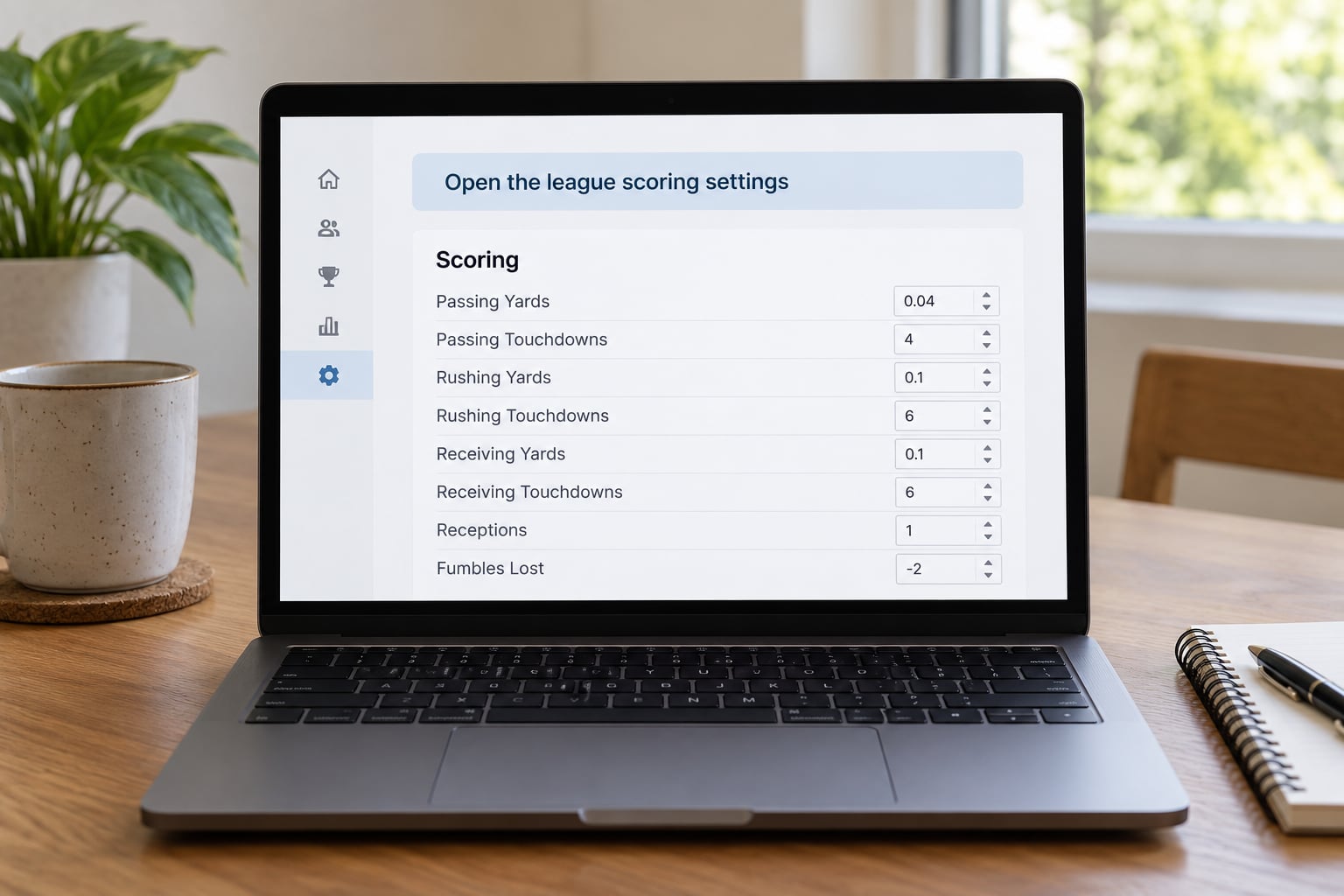
Menu labels differ across every platform, which is the single biggest reason generic advice gets distrusted. Here is how each one names it.
- ESPN: the LM Tools tab inside your league, then League Settings, then the Scoring section. ESPN also exposes scoring edits to the league manager through the same tools area, and its own help content points people at the Scoring area with a dropdown per category. Inside Receiving, the dropdown offers a customize-by-position option rather than a single league-wide value.
- Yahoo: the League tab, then Settings, then the scoring and settings section. Yahoo’s own help documentation tells you to click Settings in the League tab to confirm which scoring mode your league uses, which is the fastest way to check what you are editing.
- Sleeper: League, then Settings, then the scoring rules area inside league settings.
- NFL.com: Commissioner tools or League Settings, then Scoring. The commissioner controls roster and scoring edits from that area.
- Fantrax and MyFantasyLeague: both put scoring under league settings with per-category point value fields; Fantrax tends to expose the most categories, including defensive ones.
Platforms move these menus between seasons, and the labels above have shifted more than once. If a path does not match what you see, search the site’s own help section for the platform name plus scoring settings rather than trusting an old screenshot from any article, including this one.
Set the value for each scoring category
Now you map statistics to numbers. Most platforms show one field per category and let you choose points per unit, so a value of 0.04 on passing yards means one point for every 25 yards.
A workable PPR table that you can copy as a starting point, using per-unit rates:
- Passing yards, 0.04 | Passing touchdowns, 4 | Passing interceptions, minus 2
- Rushing yards, 0.1 | Rushing touchdowns, 4 | Fumbles lost, minus 2
- Receptions, 1 | Receiving yards, 0.1 | Receiving touchdowns, 4
- Kicking field goals, 3 | Extra points, 1 | Kick distance, 0.04
- Defensive interceptions, 3 | Defensive fumble recoveries, 2 | Sacks, 4 | Safeties, 5
Work out each line by hand before you save. Yardage at 0.04 pays a 100-yard receiver one point. At 0.1, the same catch for 10 yards is one point, which is the mechanic behind a heavily inflated receiving game.
Where the platform supports it, use the position-specific option instead of a single value. Customizing by position lets you pay more for a wide receiver’s yardage than a tight end’s, or set an identical value for every position if that is your preference. A league that wants every skill player valued the same way turns this off and uses one flat table.
Add thresholds, bonuses, and penalties
Bonuses are additive and sit on top of base scoring, which is where most mistakes happen. If a 4-point touchdown and a 3-point big-play bonus both fire on the same play, the player gets 7. Decide whether that is intended before you complain about it later.
The bonus rules leagues actually use:
- Touchdown bonuses. One extra point for a passing score over a certain yardage, or a flat bonus for every touchdown regardless of play type. Six-point touchdowns are common in two-player leagues.
- Yardage thresholds. Additional points at 100, 150, or 300 yards. A 0.5 point first-down bonus is the same idea applied to a different stat, and it pushes draft boards hard toward volume players.
- Shutout and defensive bonuses. A flat bonus for holding an opponent under a yardage or point threshold, sometimes with a negative value on the other side so shutting someone out is genuinely rare.
- Turnover penalties. Interceptions and fumbles lost carrying negative values. Keep them visible as negative numbers in the settings table rather than burying them in a general penalty field, so members can see exactly what a pick costs.
- Game-winning kick bonus. A flat bonus for a field goal that decides the game. Popular in casual leagues, and one of the most requested custom rules in commissioner forums. Note that some platforms will only pay it if you can express it as an existing bonus type rather than a brand new stat category.
That last point matters more than it sounds. Editing a point value is nearly universal. Adding a stat category the platform does not track by default is a different request, and the honest answer to whether you can do it depends on the platform and the sport. Check the category list before promising your league a rule.
Save, copy, and test the rules

Testing is the step people skip, and it is the one that catches arithmetic errors before they reach a standings table.
Pick three sample lines and run them by hand first. A 24-carry, 118-yard, 2-touchdown running back with 4 receptions. A defense with 3 sacks, an interception and 2 points allowed. A kicker with 2 field goals, 2 extra points and 40 yards of distance. Calculate what your custom table should award, write the numbers down, then check the platform’s own scoring preview against them.
If the totals do not match, the usual causes are a rate you typed as a per-game value when it should be per unit, a bonus applied at a threshold you set one yard too high, or a category still carrying its default value because you edited a neighboring field.
Keep a copy. Save the settings, then export or screenshot the full table, and put it somewhere the whole league can see. Some platforms offer a settings or rules copy feature for commissioners, which is faster than retyping values if you ever need to roll back.
Publish the settings and communicate the change
When you save, notice when the change takes effect. On most platforms, editing scoring recalculates weekly totals from the edit onward, and some will regrade earlier weeks in the season using the new values. That is the behavior behind the most common complaint in commissioner forums: a league drafts under one scoring environment and wakes up in a different one, and nobody remembers agreeing to it.
So set scoring before the draft, or in the offseason, and treat it as locked once the season starts. If you must change something mid-season, post the exact old value, the exact new value, the date, and whether prior weeks are being rescored. Then get a majority acknowledgement in the league chat before you save.
Send the final table to every member in a message they will actually see, not a buried league message. Include the scoring model in plain words, the tie-breaker order, and what happens to a zero, because those three answer most end-of-season arguments.
Common Mistakes
Wrong category weights. You set yards to a per-game value instead of a per-unit rate, so every player scores 100 times too much. Fix: confirm the platform’s units first, then sanity check one 100-yard game before saving.
Double-counted bonuses. A big-play bonus and a touchdown bonus both firing on one play, usually because thresholds overlap. Fix: set thresholds so no single play can trigger two bonuses unintentionally, and write the overlap case into your rules note.
Vague negative points. Interceptions at minus 2 but fumbles at minus 1 without explanation, which produces an argument every time a backup quarterback starts. Fix: publish a one-line table of every penalty.
Changing rules after the draft. The trust problem. Commissioners in r/FFCommish and r/DynastyFF describe the same scenario: settings changed right after a draft concluded, and the league spent the season arguing about a scoring environment nobody picked on purpose. Fix: lock scoring before the draft.
Forgetting a setting entirely. A dynasty commissioner on r/DynastyFF described running a full season under unintended rules because one setting was never changed. Fix: use a written checklist and have a second person verify it.
Assuming every platform labels things the same. LM Tools on ESPN, Settings in the League tab on Yahoo, League Settings on Sleeper, Commissioner tools on NFL.com. Mixing them up wastes an hour. Fix: use the exact path for your platform and confirm in that platform’s help section.
Untested settings. You save and immediately go to bed. Fix: never save scoring you have not run through one complete sample stat line.
Two habits cover most of those. Keep scoring changes to the offseason, which is when a lot of leagues treat this as a ritual anyway. And document the final table somewhere outside the platform, because if the rules only exist inside a settings page, the first person to lose access becomes the person who cannot explain the league.
Frequently Asked Questions
Can I set custom scoring on every fantasy football platform?
Yes, every major platform lets a commissioner change point values for the standard football categories, usually under league settings or commissioner tools. What varies is depth. Some expose defensive and IDP scoring, some let you set a different value per position, and some refuse any stat category they do not already track. Check the category list on the settings page before promising your league a custom rule.
What is the difference between custom scoring and a scoring preset?
A preset is a ready-made package such as standard, PPR or super PPR, and picking one loads a complete set of values in one click. Custom scoring means you type or edit the numbers yourself, category by category. Most platforms let you start from a preset and then change only the lines you care about, which is the fastest route to a league-specific setup.
Can a commissioner change scoring settings during an active season?
Technically yes, and that is the problem. Editing scoring mid-season can regrade earlier weekly totals under the new values, which moves standings without anyone changing a lineup. Community consensus is to lock scoring before the draft or in the offseason. If a change is unavoidable, post the old value, the new value, the date and whether prior weeks are rescored, and get league agreement first.
How do I test custom scoring before it affects my league?
Calculate a full sample stat line by hand, then enter the same line in the platform scoring preview and compare. Test a quarterback, a running back and a defense so several stat types are covered. A test league on the same platform is even better, since it catches saving and rollback problems that a preview cannot. Fix any mismatch before the values touch a live league.
Why do my custom points differ from the platform’s scoring preview?
Usually a units error: you entered a per-game number where the platform expects a per-unit rate, so yardage pays out a hundred times too much. Threshold bonuses set a yard or point too high are the next most common cause, and a category left at its default value because you edited the field above it is a close third. Recheck one ordinary game and one bonus case after any edit.
Conclusion
Start by writing down the scoring model you want, including every bonus and penalty, in plain text. Then open your platform’s rules area using the exact path for that site, save a backup of the current values, and run one complete sample stat line through the preview before you save anything.
Once the math checks out, publish the final table to the league and lock it. Scoring set before the draft is a house rule. Scoring changed after it is a negotiation, and nobody enjoys having that argument in September.